

By Darlene Killen, founder of The Visible Practitioner
The Brain Offload Method is a simple system for running your life with AI. Notion holds every detail, Claude does the thinking, and Google Calendar delivers the plan. Instead of keeping your household and your work in your head, you store it once and ask for it when you need it. I built it after burning out as the only person who knew everything, or my partner having to be a co-pilot for that, and it took my weekly planning from hours down to a few minutes.
Here’s how it started.
Nothing in this house falls apart when I do anymore. That’s new.
Before I designed, built, and tested the AI systems I use, I was the thing holding it all up.
I was carrying weight I didn’t want. Wrung out from stress. My skin looked rough, my hair was a frizzy mess, and my gym routine and meal planning were completely random and frustrating to navigate. My partner was my rock while I was put through a grueling legal fight I never wanted, carrying his own load the whole time. The kids were bored.
And I was the brain for all of it. Every meal, every appointment, every detail lived in my head. When I ran out of gas, the whole house stalled.
So I stopped white-knuckling it. I built small AI tools, one for each part of our life. Not to take over our life. To hold the details, so I could get my time back. I designed a Brain Offload Method for my household

What is the Brain Offload Method?
Three tools, three jobs. Notion holds every detail. Claude does the thinking. Google Calendar hands me the plan. I stop trying to remember things, and I ask instead.
What are the three tools?
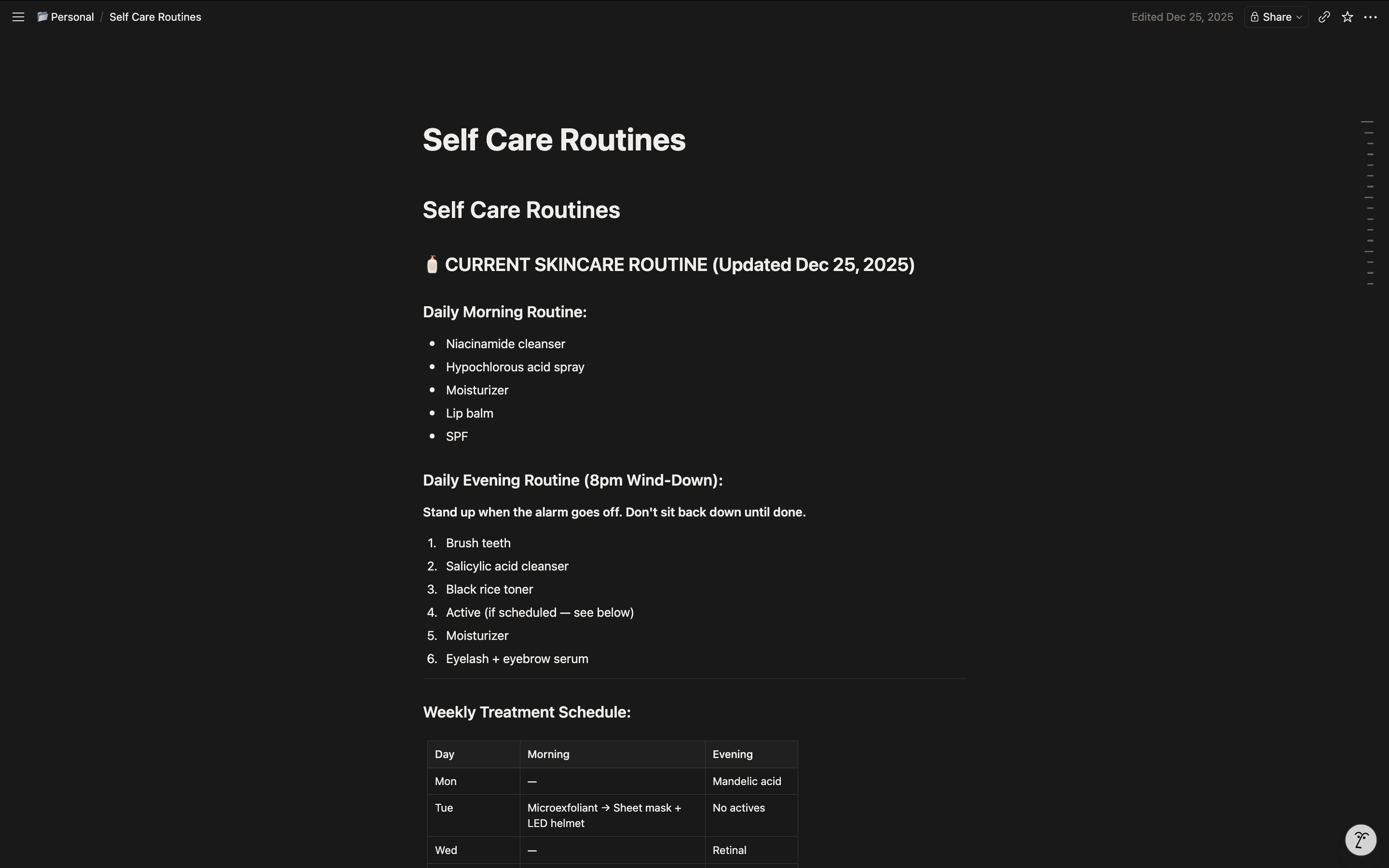
Notion is the filing cabinet.
It holds every detail. Meals, chores, appointments, the kids, my businesses. I don’t like opening Notion. It’s messy. That’s fine. I built it so I never have to.
Here’s the part that saves me: Claude is the one that files the details into Notion in the first place. So it always knows where each thing lives. I don’t have to remember any of it. I just ask.
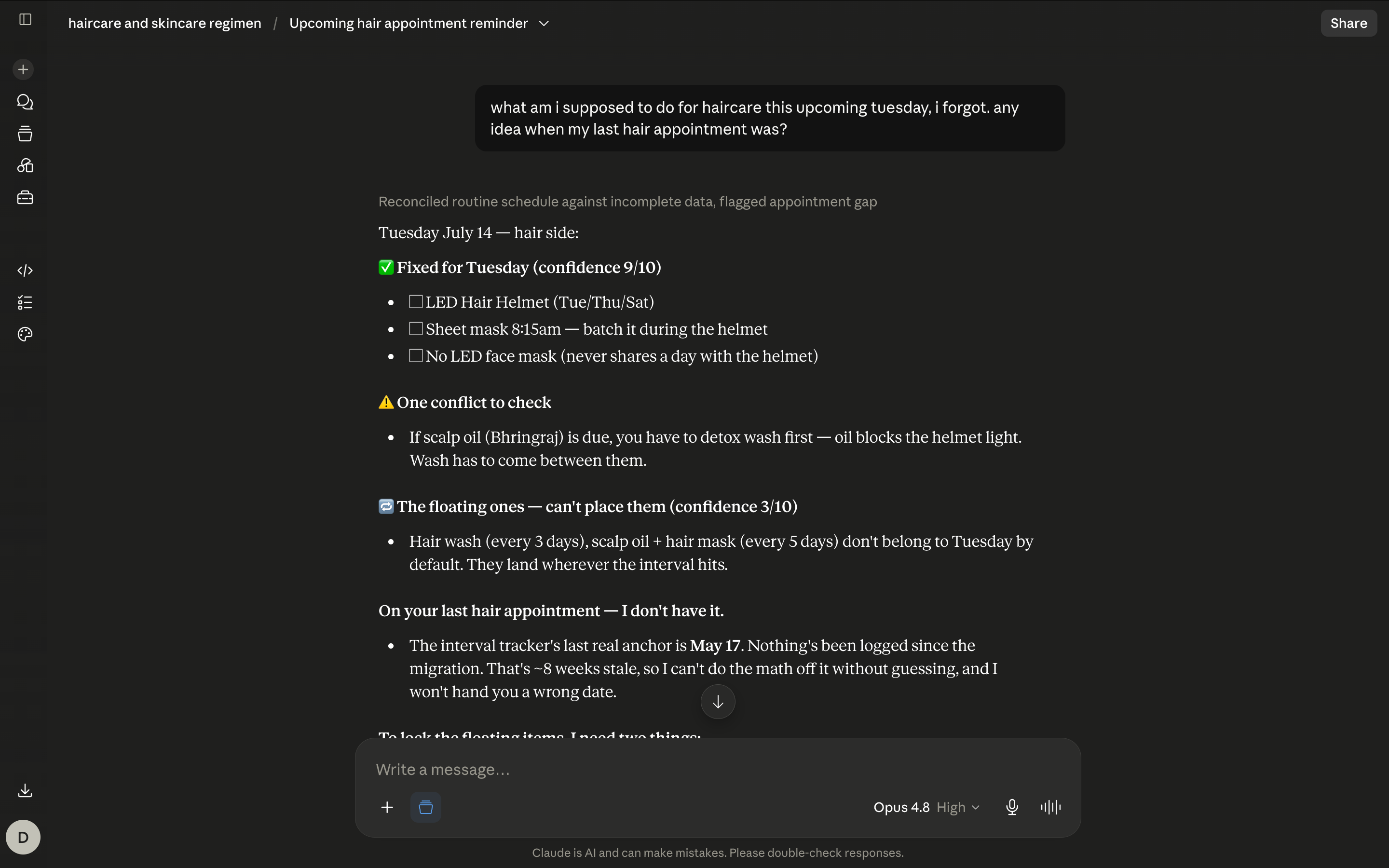
Claude is the brain.
I ask a question in plain words. Claude goes into Notion, finds the answer, does the thinking. I don’t dig through the mess myself. I ask.
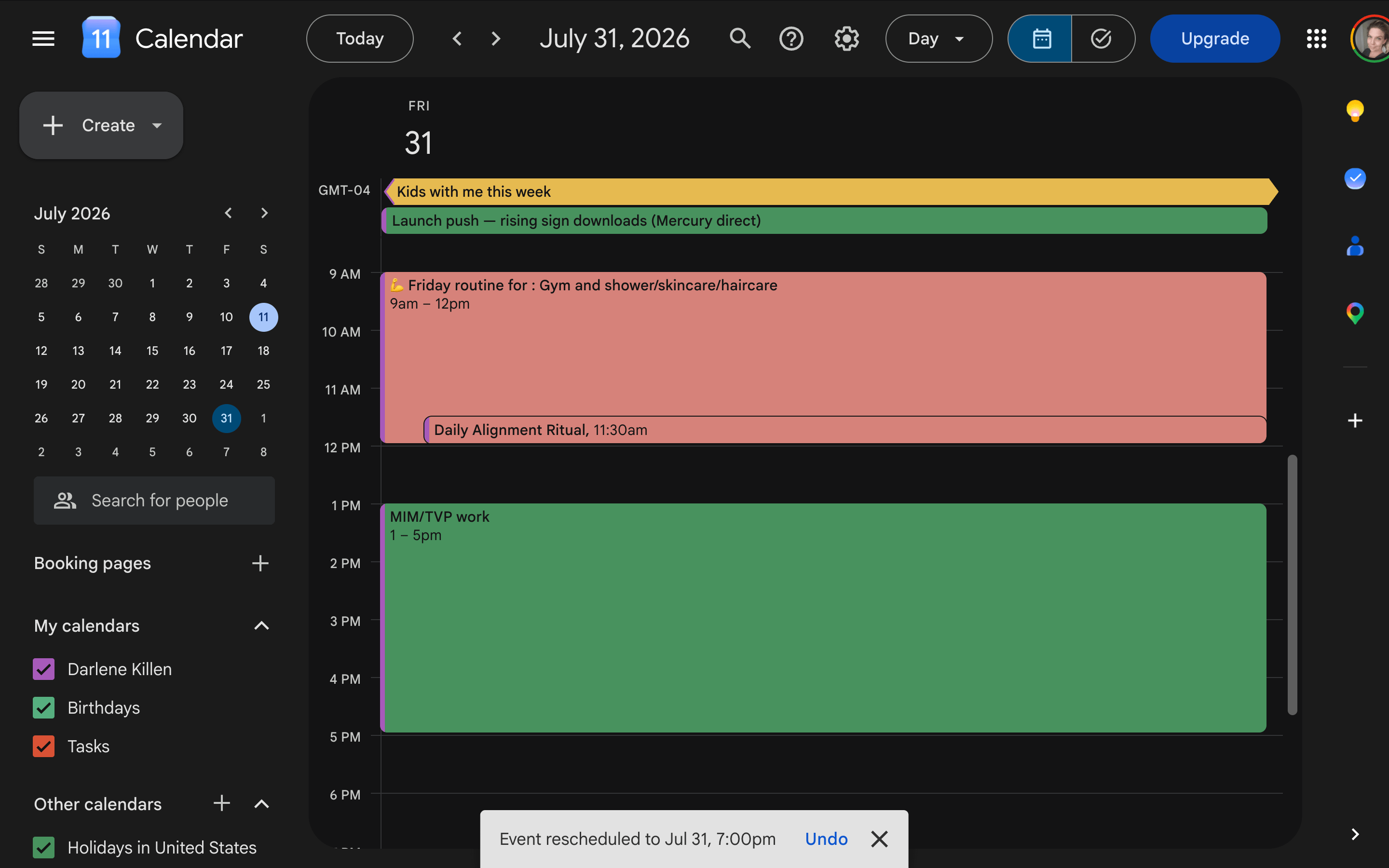
Google Calendar is the delivery.
Claude writes the plan onto my calendar, color-coded so I read it at a glance. Mine is simple on purpose:
Pink for my personal stuff
Green for anything income-related
Yellow for the kids
You pick your own colors, but pick a few. Too many and you’ll confuse yourself trying to remember what each one means. I open my day and the color tells me the shape of it before I read a single word. That matters on a low-energy morning.
Here’s the part that changed things with my partner. Since the whole plan lives in Google Calendar, all I had to do was share the calendar with him. Now he has everything. Times, locations, what needs doing. Chores, dinner, errands, all of it.
He just picks it up. I don’t make him a list. I don’t send reminders. I don’t explain. He opens the same calendar I do and sees the whole picture. The system carries it, so I don’t have to be the one handing out tasks.
How does it get smarter over time?
When Claude gets something wrong, I tell it what missed and why. That note gets saved into the folder(“project”), so it sticks. Next time it already knows. I feed it the reason, not just the fix. A little sharper every week.
What does it cost to keep running?
Not much, but it isn’t zero. It doesn’t read my mind. If I don’t tell it something, it won’t know. Once a week I spend a few minutes catching it up on what changed. That short check is the only upkeep. It replaced hours of me being the glue.
Is the AI in charge?
No. It doesn’t run us. It runs the boring parts for us, as AI should do, instead of trying to replace a whole person. We get the rest of our life back. More rest, more time together, fewer nights feeling behind.
Where is this headed?
Every week I open one piece of the Brain Offload Method and show you how it’s built, with something you can copy and try that day. I start with my own stuff. Then the kids’. Then my partner’s. Same system, shaped to each person.
As I go, I’m building a full walkthrough you can buy, so you can set up a similar system in your own life, start to finish.
One honest note on that: the setup has nuances. If you don’t have a laptop or desktop, or you use a different AI platform, the steps change. That version needs a custom walkthrough from me. So whatever your setup looks like, you can end up with exactly the system that fits your life.
Follow along, and take whatever helps you.
Subscribe and I’ll see you in the first build.
Common questions about the Brain Offload Method
What is the Brain Offload Method?
A system for running your household and your work with AI. Notion stores the details, Claude does the thinking, and Google Calendar delivers the daily plan, so you stop carrying everything in your head.
What tools do you need?
Three. Notion, Claude, and Google Calendar. A laptop or desktop makes setup easier. A different AI platform can work with some changes.
Do you need to be technical?
No. You talk to Claude in plain words. It does the filing and the thinking. If you can send a text, you can run this.
How is this different from a to-do app?
A to-do app still needs you to remember, enter, and check everything. Here the AI files the details and hands you the plan. You ask instead of remember.
How much time does it take to keep up?
A few minutes a week to catch the system up on what changed. That short check replaces hours of being the one who holds it all together.