


By Darlene Killen, founder of The Visible Practitioner
The problem
I built this for a household where grocery shopping had turned into a weekly mess.
Too many stores, each good at different things. No easy way to know where something was cheapest without checking four apps. And all of it lived in one parent’s head, which was already full.
Plans got lost. Nobody else could see what to buy where. So the whole chore fell on one person, week after week.
This isn’t a standalone app. It’s a grocery module I built on top of a meal planner they already had, so the two run as one system. In one line: it reads the week’s meals, builds the grocery list, subtracts what’s in the kitchen, sorts every item by the store where it’s cheapest, and posts the lists to the family calendar.
If you have a need for something like this to be built for your life, that is what I do. You tell me what’s eating your time, we build it together out of the tools you already have, and you never learn a new app. Details at the bottom.
What they already had
They already had the meal system I set up on the same tools, so the week’s dinners were decided every Tuesday.
This grocery system is a module bolted onto that meal planner. Same tools, same calendar, one more layer. The meal planner decides what they’re eating, and the grocery module turns that into what to buy, where, and for how much. No new app, nothing new to learn.
The four helpers, and what each one does
Think of it as a small team. Each one has a job.
Claude, the organizer. The one the parent talks to. It thinks, keeps the rules straight, builds the lists, and remembers how the house likes things done. It also wrote the saved price-check prompt the scout runs, so every check looks for the same items the same way.
Claude in Chrome, the price scout. The organizer can’t see inside store accounts. So this one rides along in the parent’s logged-in browser and reads the real prices at Aldi, Walmart, Costco, and Target. It runs the saved prompt against the household’s own recurring items, and each store account is set to their local store, so the numbers are for the shelf they’ll really stand in front of, not a national average.
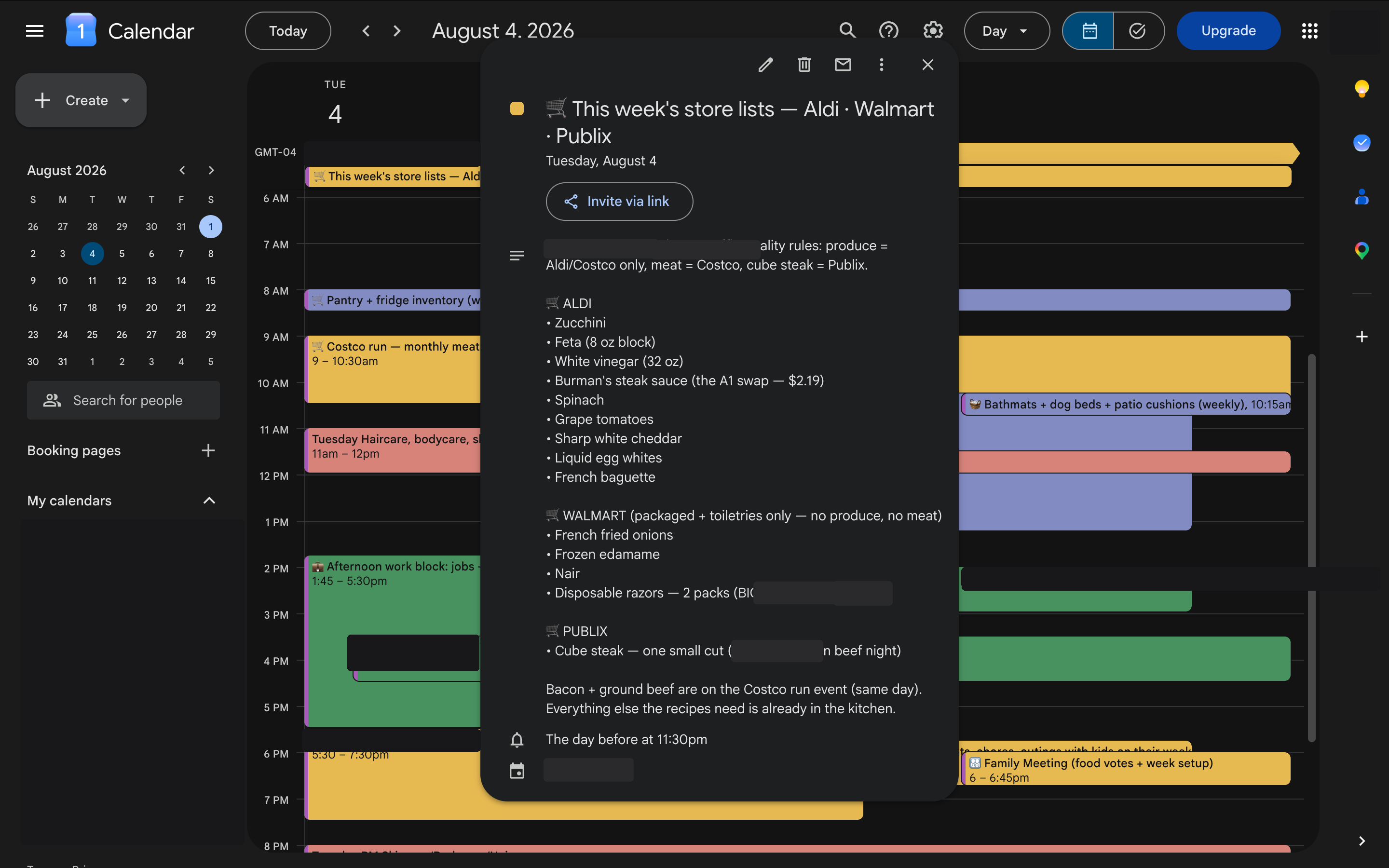
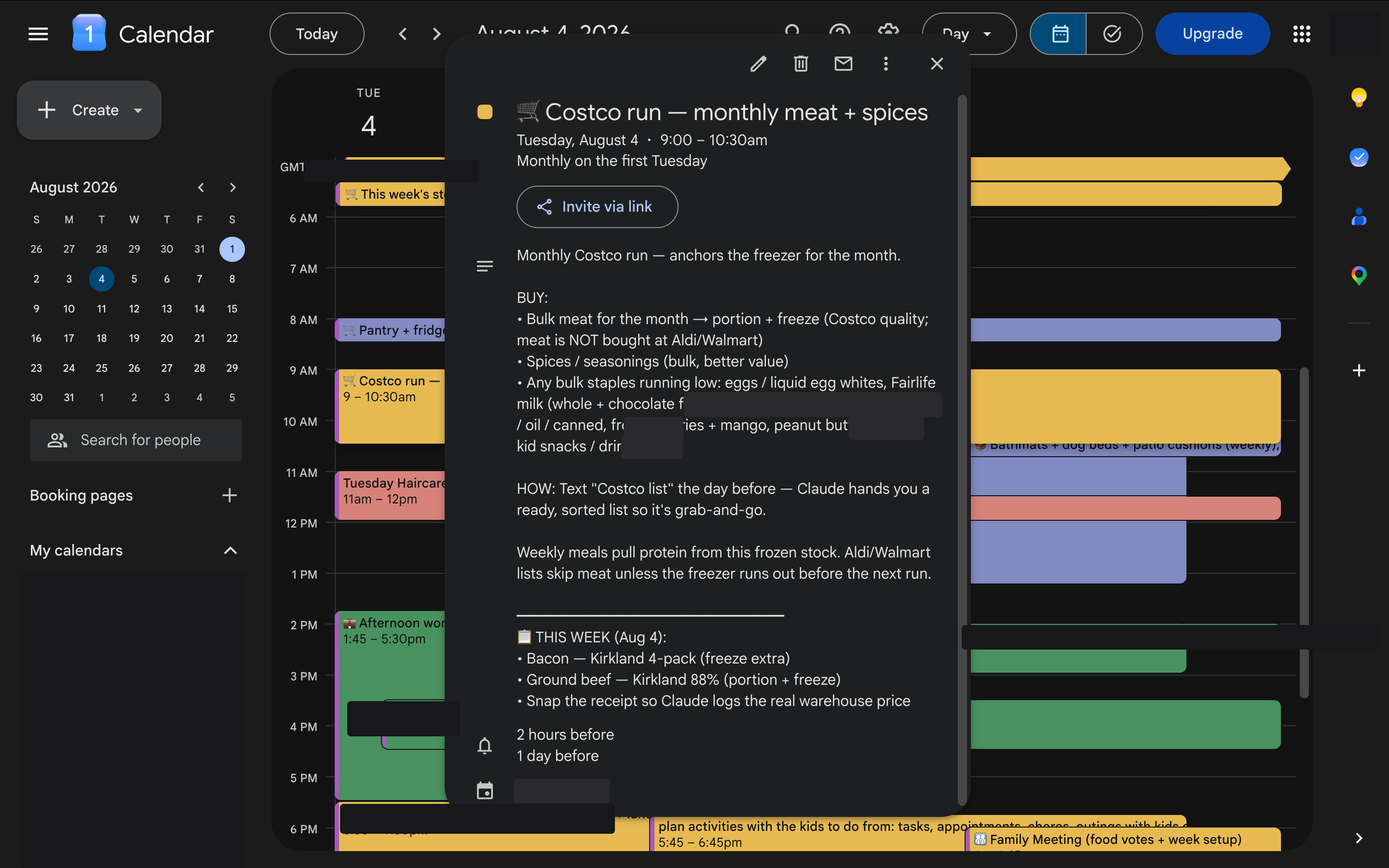
Google Calendar, the bulletin board. Where the plans live so everyone can see them: the meals, the cook blocks, and the shopping lists for each store. It’s shared, so anyone in the house who’s headed out can open it and see what to buy, how much, and the price. No texting back and forth to check which brand or how many.
Notion, the memory. It holds what’s in the kitchen, everyone’s food likes and dislikes, the recipes, and each person’s food needs, so the system never rebuys what’s on hand or cooks something someone won’t eat.
That’s the whole shape of it. Notion remembers, Claude thinks, the calendar delivers, and the week gets sharper each time. I call it the Brain Offload Method.
What I built
A price book. A running record of what things cost and where. The parent never types in it. They snap a photo of a receipt or a shelf tag, or send one line like “eggs $3.12 at Aldi,” and the organizer files it. Over time it learns the household’s regular prices, so it can say which store is cheapest on demand.
The store rules. Quality comes before saving a few pennies, and every list applies these without being asked: produce goes to Aldi or Costco, meat goes to Costco, cube steak comes from Publix in a small cut, and Walmart is packaged, pantry, frozen, household, and toiletries only.
Seasonal and sale awareness. The system holds a month-by-month, in-season produce guide for their area, plus a calendar of when stores usually run their sale cycles. Each week it flags what’s in season and on sale, and when a recipe calls for out-of-season produce, it suggests a fresher, cheaper swap, or a frozen option, fitting the household’s dietary targets. It’s a suggestion, never forced.
The price-check prompt. A saved instruction the scout runs the same way every time. It checks the household’s recurring items at each store, with each account set to their local store, so the prices come back accurate to where they shop instead of a national number. Run it, and it returns real, current, local prices to compare.
The weekly build. Every Tuesday evening, right after the meals are decided, it runs itself. It reads the week’s meals off the calendar, builds the list, subtracts what’s in the kitchen, sorts everything by store, and posts the lists back to the calendar. It checks first so it never makes duplicates, and it hands the parent just the few new items that still need a price-check.
How it works now
Tuesday night: the list builds itself and shows up on the calendar, with what’s in season and on sale flagged at the top.
Anyone who can shop: opens the shared calendar and sees what to buy at each store, how much, and the price. Whoever’s free can grab a run without a clarifying text.
The parent: runs the saved price-check on anything new, then shops.
After shopping: they snap the receipts, and the price book fills in a bit more.
It’s one week old. The first fully hands-off run happens this week, so I’m keeping a close eye on it.
One actual number
On one item, a store-brand swap the system flagged saved $3.53.
A.1. steak sauce ran $5.72 at Walmart. The Aldi store-brand version came back at $2.19. Same shelf job, a $3.53 gap the household would have paid without noticing.
The first baseline pulled 116 real prices across the four stores. Every “cheapest” call comes from those receipts, never a guess.
What I got wrong first
Early on, I made the exact mistake this kind of tool is famous for.
After one sweep of prices, I built a “cheapest store” cheat sheet and presented the winners like settled fact.
The parent stopped me cold. One sweep isn’t enough to know what anything costs. They were right. A single price reading tells you almost nothing. Prices move, and sales throw off a single number. One reading isn’t a pattern.
So we downgraded the cheat sheet to “first guesses, not verified,” and turned the lesson into a permanent rule the system reads every time: never call a store cheapest for something it has seen only once.
What I tried first and threw out
I first set the weekly build to run Monday morning. Start of the week, clean, made sense on paper.
It was wrong. The meals aren’t decided until the Tuesday meeting, so a Monday list would have been built on nothing. I moved it to Tuesday evening, right after the meals lock in. A system like this is only as good as the moment you run it.
One unglamorous thing nobody tells you
The rules can’t live in the AI’s memory. They have to be written down where it re-reads them on every run.
Anything important that only lives in a model’s head eventually drifts. So every store preference and every guardrail sits in a document the helpers open each time. That’s what makes it something you can trust instead of a party trick.
Something you can try today
Start a price book. One note on your phone.
Next time you shop, write down five things you buy every week, what they cost, and the store. Just five. Do it twice.
The second time, you’ll already see which store wins on which item. You don’t need any software to start. You need the same price written down more than once.
Where this is headed
Right now the parent still does two things by hand: the quick price-check, because the scout needs their logged-in browser to see prices, and the actual shopping and receipt snapping. The rest runs on its own.
The design is that it gets lighter every week, because the more they shop, the more prices it already knows. One week in, that’s what it’s built to do, not something I can prove yet.
FAQ
What tools does this use? Claude, Claude in Chrome, Google Calendar, and Notion. All tools the household already had. There’s nothing new to learn.
Is this separate from the meal planner? No. It’s a module built on top of their meal planner. The meal planner decides the week’s dinners, and the grocery module turns those into a store-sorted shopping list on the same calendar.
Does it know what’s in season? Yes. It keeps a month-by-month, in-season produce guide plus a store sale-cycle calendar. Each week it flags what’s in season and on sale, and when a recipe calls for out-of-season produce, it suggests a fresher, cheaper swap.
Are the prices for my real local store? Yes. Each store account is set to the household’s local branch, and the scout runs a saved prompt that checks their items there. The numbers match the shelf they’ll stand in front of, not a national average.
Can someone other than the parent do the shopping? Yes, and that’s part of the point. The lists sit on the shared calendar with the store, the amount, and the price, so anyone in the house who’s free can pick up a run without texting to ask what to get.
How does it know which store is cheapest? It reads real prices from the household’s own logged-in store accounts through the browser, logs them in a price book, and only calls a store cheapest once it has seen that price more than once.
Does it shop on its own? No. It builds and sorts the list and posts it to the calendar. A person still runs the price-check and goes to the stores.
What keeps it from making things up? Every rule lives in a written document it re-reads on each run. It only uses prices from real receipts. And it always gives one suggestion a person can say no to, so it never goes off script.
Can you build this for my family? Yes. It’s a custom build on the tools you already use, sized to what your household can keep up with. That’s what the closing is about.
What part of your day annoys you?
What’s the thing you’d love an AI tool to just handle?
Chances are we can figure it out together, without you learning a new app. You just talk to Claude or Gemini or ChatGPT, and the AI does the backend work.
Tell me what it is. I build these for people.